 DTechnology DTechnology – Software Tutorials, Game Tips and Reviews

Bypass or Remove Windows 10 password is actually pretty easy, to bypass it you dont have to install any software.Sometimes we’re in hurry and have to do lot of task at once, so we turn on our computer and then leave it to boot.That what we do before we using windows 10, since Windows 10 released we have to type our password or click sign in button before enterh the desktop and thats quite annoying for some people.So in this quick article, I’ll show you how to bypass those password and its screen like our beloved Windows before Windows 10 arrived.
Lets Get Started !!!
Open Run

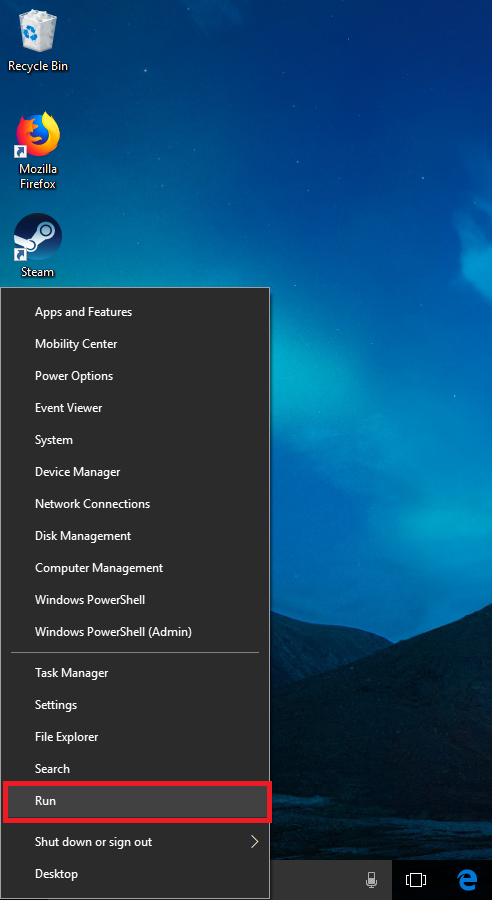
Firstly, we have to open “Run”.We can do this by Right click at start menu and press run or by pressing Windows + R.
Type netplwiz
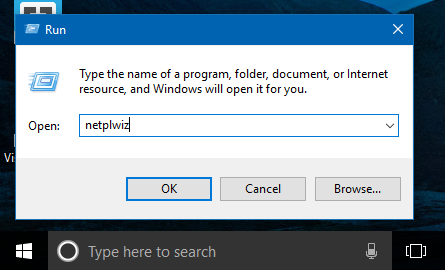
Type ‘netplwiz’ and then click OK
Uncheck CheckBox
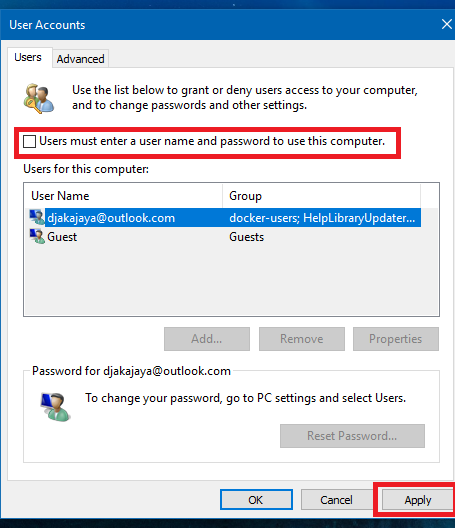
Uncheck Users must enter a user name and password to use this computer, then click Apply
Type Your Password
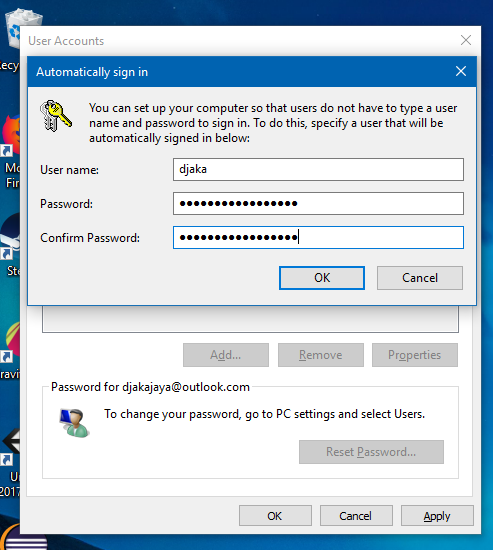
Type your password at Password’s textbox and retype your password at Confirm Password’s textbox then click OK.
Click OK again
And Finish !!!
Now you’ve get rid from that annoying login screen at Windows 10