In Unity 5.5, support for Microsoft Holographic (HoloLens) is no longer in preview mode, and that means you can now jump into exploring the future of augmented and mixed reality. They have also improved our In-App-Purchase feature with a codeless experience to take advantage of storefronts and added CloudMoolah.
Better tools for artists
In Unity 5.5, there’s major improvements to Particle System and Line Renderer components.Animation Window has workflow improvements and massively improved performance for faster, more reliable iteration. Then there’s the new Splash screen tool, which lets you introduce your brand at the start of your game with just a few clicks. Also introducing an experimental tool called Look Dev to ease the process of ensuring parity in materials throughout physically-based projects. Looking to the future, they’re excited to introduce Unity Collaborate to everyone (Open Beta!), a simple way for entire teams to save and sync their Unity projects.
Performance improvement
Finally a lot of the new features aim to improve performance, so you can deliver the best experience to your users on all platforms. For example, they’ve added GPU instancing for Android and iOS, a new CPU Usage Profiler timeline view, and they’ve updated our physics engine to PhysX 3.3.3.
Microsoft Holographic (HoloLens) ready in 5.5
Support for Microsoft Holographic is now shipping with Unity 5.5..Also improved the workflow by bringing Holographic Emulation right into the Unity Editor. Developers creating applications for HoloLens will be able to prototype, debug, and iterate on design directly from the Unity Editor without needing to build and deploy to an actual HoloLens device. See the details in the Holographic documentation.
Codeless IAP and extended platform support
The new Codeless IAP feature makes it easy to port in-app purchases to multiple stores and automate the transaction flows in real time. In addition to Apple App store, Google Play, Amazon, Samsung, Windows Store and Tizen Store, Unity IAP is extending support to the Cloud Moolah and Xiaomi (Coming soon) helping you to monetize in Asia.
Improved Particle System
A new Lights Module allows you to attach real-time lights to a percentage of your particles, and lights to inherit properties from the particles they are attached to. Now it’s simple to make your particle effects cast light onto their surrounding environment:
The new Noise Module enables you to apply turbulence to particle movement, with quality settings that allow you to choose between cheap and efficient noise or smooth high quality noise. In this following example using the Noise Module, we added turbulence to particle movement creating erratic, jerky movement, or smooth, flowing movement:
The Trails Module features a range of useful settings to achieve various effects.
It’s now possible to send custom data into your particle shaders, such as their size, rotation and velocity. You can also send tangents to your shaders, allowing for normal mapping.
Faster iteration in the Animation Window
Animation Window has workflow improvements and massively improved performance for faster, more reliable iteration.
First, we added a new box tool in the Animation Window. This allows far simpler moving, scaling, and even ripple editing (“r” hotkey) of keyframes in both Dopesheet and Curves. Demo Click here
Better Line Renderer Component
Unity 5.5 offers a major improvement to how Unity renders lines and trails: The LineRenderer, which renders a line between a specified set of points, and the TrailRenderer, which renders a trail behind a moving object, have both been upgraded to use an improved line drawing algorithm.
New Splash Screen Tools
The new splash screen tools make it easy to add l your company, publisher and game logos as a splash screen (which appears when your project is launched). There’s a broad range of easy-to-configure options: Sequencing of logos, Made With Unity co-branding, background imagery, animation, and more.
Look Dev for asset visualization & validation (Experimental)
Look Dev is an HDR (high dynamic range) image-based lighting tool that allows you to check and compare assets through a viewer to ensure they are correctly authored for various lighting conditions.
Look Dev is designed especially for texture artists, modelling artists, lighting artists, art directors, outsourcing managers, and anybody else involved in the visual art style of a project who needs to perform asset visualization and validation.
Built-in to Unity, Look Dev eases the process of ensuring parity in materials throughout physically-based projects.
Look Dev is an experimental feature in Unity, see the docs for details.
Visual Studio Code & Unity
Added support for Visual Studio Code on macOS and Windows. Once it’s selected as your external script editor, Unity will open your scripts directly in Visual Studio Code. And debugging is also possible via the VS Code Unity debugger extension.
Unity Collaborate beta available for all in Unity 5.5
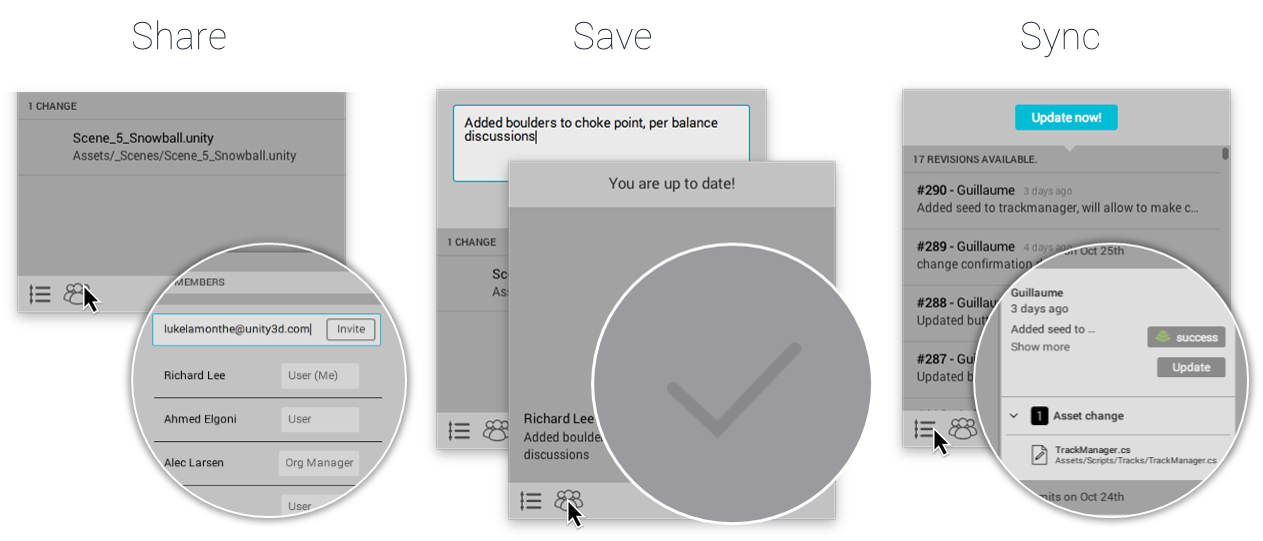
All Unity 5.5 users are invited to join the open beta for Collaborate, a simple way for teams to save, share, and sync their Unity projects. It’s easy to use so the entire team can contribute regardless of location or role.
 DTechnology DTechnology – Software Tutorials, Game Tips and Reviews